Payload CMS: Modern CMS, Next.js-based
Author
fityannugroho
Date published

In today's digital age, the need for a flexible, fast, and easily customizable Content Management System (CMS) is increasingly important. Many developers and companies are moving away from traditional CMSs toward more modern solutions. One option that is currently on the rise is Payload CMS.
This article will discuss why Payload CMS is right for you, including its concept, features, and comparisons with other popular CMS platforms such as WordPress, Strapi, and Directus. Plus, there's also a special template that's perfect for those who want to create a blog quickly.
What is Payload CMS?
Payload CMS is a Node.js-based CMS that focuses on flexibility and ease of use for developers. What makes Payload even more special is its integration with Next.js, a currently popular full-stack framework.
With Payload, you'll get features like a React-based Admin Panel, automatic database migration, built-in REST and GraphQL APIs, and live previews for your content. All of this is designed to speed up development and give you “superpowers” in building modern web applications.
Features
- Admin Panel: Using React server/client components, fully customizable with your own React components. No need to bother building your own admin panel or using ORM.
- Automatic Database Schema: Includes direct access to databases, migration, transactions, good indexing, and more.
- REST, GraphQL, and Direct Node.js API: Ready to use for your application.
- Authentication: Can be used in your own applications.
- Customizable Access Control Patterns: Easily configure roles and permissions. Highly flexible for various needs.File Storage & Image Management: Includes tools for cropping and focal point selection.
- Live Preview: See content changes in real-time on the frontend as you update.
- Hooks and Middleware: Add custom logic at different stages of data handling.
- Multilingual Support: Manage content in multiple languages.
- And More: Other features ready to support your needs.

Post Editor with Live Preview
Related posts
The Ultimate Guide to Markdown
Headless CMS vs Full CMS
Payload CMS can be used flexibly, either as a back-end only (headless CMS) or as a full-stack solution (full CMS).
If you want a headless solution, you can use the REST or GraphQL APIs automatically generated by Payload and manage the frontend separately with another framework.
If you want a complete solution (full CMS), you can add custom components, use libraries like Tailwind CSS, and build your own pages—just as you would in other Next.js projects.
Payload CMS can also be installed into an existing Next.js project! No need to start a new one.
Concepts
Payload CMS is based on a set of intuitive and simple core concepts:
Config
The heart of everything Payload does. You can configure the application extensively through an intuitive API. This configuration is a fully extensible JavaScript object.
Database
Payload is not tied to a specific database. You can use any database through the appropriate adapter. No vendor lock-in.
Collections
Groups of documents with the same schema. Each collection is stored in the database according to the fields you define.
Globals
Similar to collections but contain only a single document. Perfect for static data.
Fields
The building blocks of Payload that define document schemas in the database and automatically generate the appropriate UI in the Admin Panel.
Hooks
Hooks let you add side effects during a document’s lifecycle, such as before reading or after creating data.
Authentication
Payload provides a secure authentication system for use in both the Admin Panel and your external applications.
Access Control
Access Control defines user permissions, such as reading, updating, or viewing specific data.
Admin Panel
Payload’s Admin Panel dynamically generates a beautiful and secure interface to manage your users and data.
Retrieving Data
Payload provides three main APIs: Local API, REST API, and GraphQL API—all of which use the same query language.
Why Payload?
- Simple and fully customizable: You control everything—data, access rights, logic, UI, etc.—without the hassle of building from scratch. Everything is managed in one place (the Payload config).
- Modern API: Supports the latest Next.js and React features, such as Server Components, Turbopack, etc.
- Type Safe: Uses TypeScript by default, auto-generated and synced with the Payload config and database.
Still unsure? Here’s how Payload compares with other popular CMS:
Payload vs WordPress
Performance: Payload is much faster because it uses Next.js, unlike WordPress which still relies on PHP.
Customization: Payload is more flexible since it’s code-based, while WordPress often depends on plugins.
Security: Payload is safer because it doesn’t heavily rely on third-party plugins or outdated programming languages.
See more: Payload vs WordPress
Payload vs Strapi
Performa: Payload is 7x faster than Strapi.
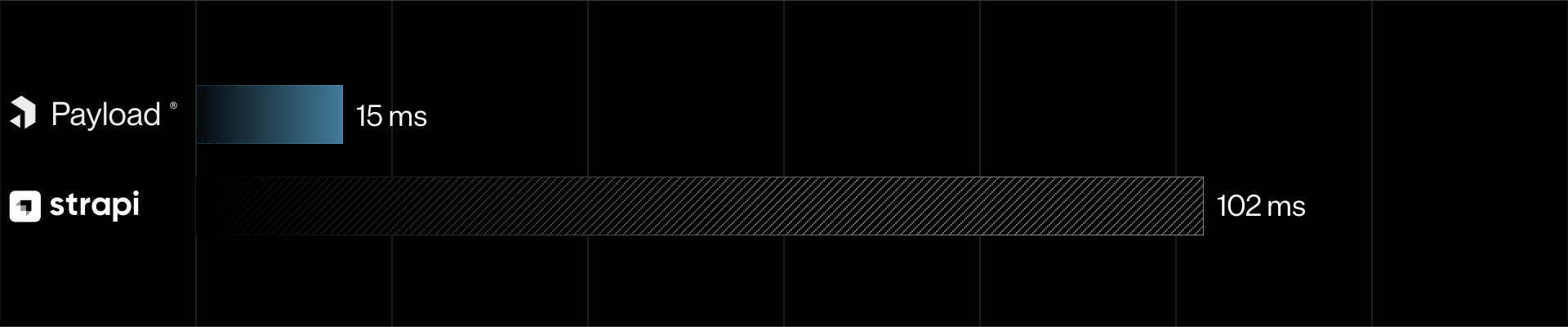
Documentation: Payload has more structured documentation, making it easier to understand.
Flexibility: All configurations in Payload are code-based, giving you full control.
See more: Payload vs Strapi
Payload vs Directus
Performa: Payload is 3x faster than Directus.

Complexity: Directus is better suited for non-technical users, while Payload is ideal for developers who need high flexibility.
Ecosystem: Payload is well-integrated with modern technologies like GraphQL and TypeScript.
See more: Payload vs Directus
Read article abPayload vs Strapi vs Directus benchmark
Template
Payload CMS also provides several official templates to help you get started quickly:
- Blank Template: Ideal for full customization according to your specific needs.
- Website Template: Suitable for websites, blogs, or portfolios of all sizes—from small to enterprise. Comes with a fully functional backend, enterprise-grade admin panel, and a beautifully designed, production-ready website.
Custom template for blogging
Payload Blog Template is a custom Payload template built specifically for those who want to quickly create a modern blog.
This template includes additional features to enhance your blogging experience, such as:
- YouTube Video Integration:
Easily embed YouTube videos in posts by simply pasting a URL. - Tweet Embeds:
Add tweets into your posts effortlessly with just a URL. - Ready-to-use Structure:
Comes with pre-defined collections for posts, categories, and users. - Pre-configured for Blogging:
Blogging essentials like SEO, access control, previews, etc., are already set up. - Pre-configured shadcn/ui:
No need to configure styling for your blog pages. Tailwind CSS and shadcn/ui are already installed and ready to use. - NEW! Role-based Access Control (RBAC) with granular permissions:
Control who can access resources by assigning roles to users and granting permissions to those roles via the dashboard. Admins can define exactly who can access what.
This template is perfect if you want to focus directly on creating blog content without the hassle of setting up a CMS from scratch.
Payload CMS is a modern solution for developers seeking a flexible, fast, and feature-rich CMS. With Custom Payload Templates, you can start blogging faster.
🚀 Interested? Get the exclusive template now and start building your project without the hassle!
Buy exclusive Payload CMS templates for blogging now!
Access will be granted after purchase.

Markdown is a lightweight markup language that allows you to format text easily. Whether you're a beginner or a pro, there's always more to learn! 🎉

Fityan CMS Blog Template: Installation Guide
This post will guides you how to install the Fityan CMS Blog Template in your local machines and deploy it to production.